Tuesday, September 19, 2023

[Qt] 執行檔需要哪些 Dll?

 1. 使用 Qt  的 windeployqt.exe 工具 (在 C:\Qt\Qt5.14.1\5.14.1\msvc2017\bin\)。

  a. 把執行檔 myProgram.exe 放在某個資料夾。

  b. 在檔案總管這個資料夾按 Shift 和滑鼠右鍵,開啟 Power Shell。

  c. 在 Power Shell 輸入 C:\Qt\Qt5.14.1\5.14.1\msvc2017\bin\windeployqt.exe '.\myProgram.exe'
      會把執行檔需要的檔案加到這個資料夾裏。
  d. 如果出現錯誤訊息 "VCINSTALLDIR not set, not running in VS Command Prompt" ,
      要把 VCINSTALLDIR 加入環境變數。(可能需要重新開機)
      可能在 [C:\Program Files\Microsoft Visual Studio\2022\Community\VC]
      

     https://blog.csdn.net/qq_36917144/article/details/114669070


Friday, August 25, 2023

[Visual C++] [Qt] 設定/變更程式的 icon


1. 在專案中加入 .rc 文字檔, 例如:res.rc,內容如下:

    IDI_ICON   ICON    DISCARDABLE     ".\\image\\icon\\a.ico"

2. 開啟 Qt Designer 載入程式的主 ui。在資源瀏覽器加入 a.ico。
    

.rc 的檔名可以改變,不一定要用 res.rc, 可以使用不同的檔名, 例如 resA.rc。

但專案中只可以有一個 .rc.

Thursday, February 16, 2023

phpMyAdmin 無法存取 MariaDB 10 的解決方法

 [Reference] https://www.qnap.com/zh-tw/how-to/faq/article/%E7%82%BA%E4%BB%80%E9%BA%BC%E7%84%A1%E6%B3%95%E5%9C%A8-phpmyadmin-%E5%AD%98%E5%8F%96-mariadb-10

簡單說:修改 phpMyAdmin 的設定檔[config.inc.php]內容:

在檔案後面加入

port: $cfg['Servers'][$i]['port'] = '3307'; socket: $cfg['Servers'][$i]['socket'] = '/var/run/mariadb10.sock';

注意事項:

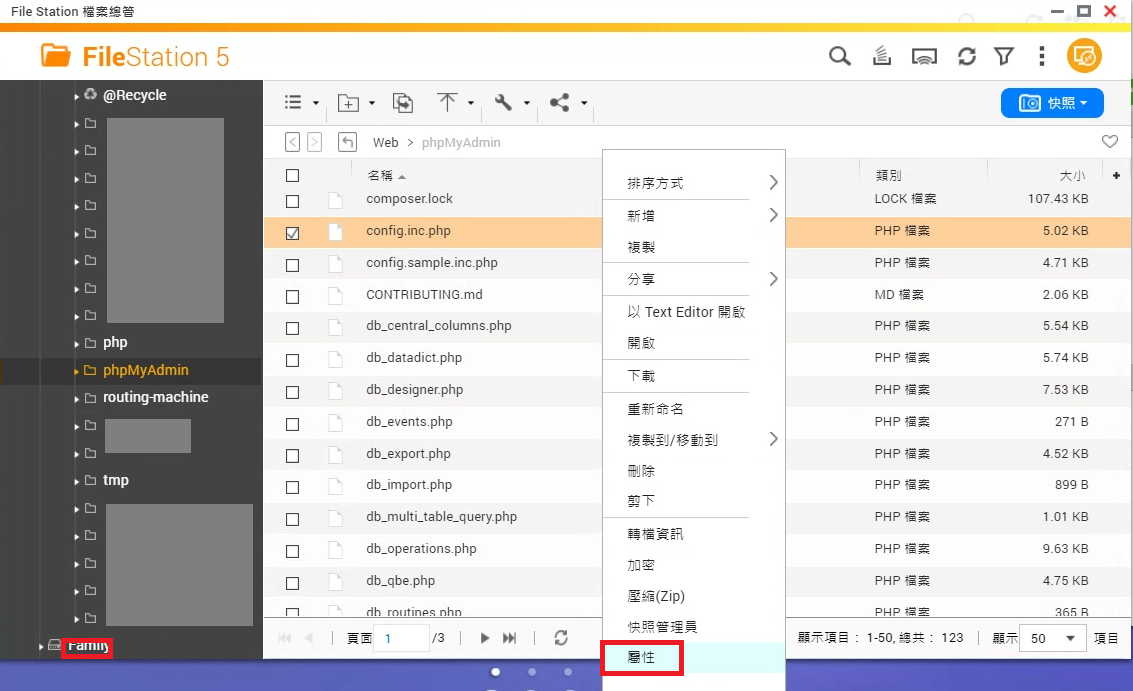
  1. phpMyAdmin 必須在啟動時,才能在 File Station 或 Windows 檔案總管看到 [phpMyAdmin] 資料夾,也才能看到 config.inc.php.
  2. 依參考資料實際操作時,因為存取權限的關係,無法用 QNAP 的 TextEditor 開啟 config.inc.php。在 Windows 下用 Notepad++ 修改後也無法儲存。解決辦法是在 QNAP File Station 把 config.inc.php 的 [寫入] 權限設定給[公開]。
  3. 修改完後必須再把剛才的授權取消,才能使用 phpMyAdmin,因為 phpMyAdmin 不允許config.inc.php有公開寫入的權限。


Wednesday, October 12, 2022

[iOS/Xcode/Swift] 讓 UIDocumentPickerViewController 可以瀏覽 Files App / Sandbox 裏的檔案


info.plist 裏的 
[Application supports iTunes file sharing]設定為 [YES] (for Files App)
[Supports opening documents in place] 設定為 [YES] ( for sandbox)


Thursday, September 29, 2022

在 Xcode 使用自己架設的 GitLab

 即使查了很多網頁,還是不知道什麼原因, 在 Xcode  專案無法直接連接到自己架設的 GitLab。

偶然間發現,在 Xcode 專案中引用一個檔案件(ex: FileHasGit.cpp),有使用 GitLab 管理,而在 Xcode 裏的 Source Control 自動把和這個檔案有關的 GitLab 資訊加進 Repositories。

這引發了我的實驗精神,終於發現,在隱藏目錄 .git 裏的 config 檔存著 remote Repositories 的訊息。把這個檔案裏的 url 修改為自架 GitLab 裏的 url,例如:

[core]

bare = false

repositoryformatversion = 0

filemode = true

ignorecase = true

precomposeunicode = true

logallrefupdates = true

[remote "origin"]

url = http://192.168.0.1:10081/Proj1.git

fetch = +refs/heads/*:refs/remotes/origin/*

[branch "main"]

remote = origin

merge = refs/heads/main


即可在 Xcode 裏 push 和 pull 自架 GitLab 的專案。

Thursday, September 22, 2022

DBF 檔案格式

[Reference] 

https://www.796t.com/content/1550563923.html
https://www.dbase.com/Knowledgebase/INT/db7_file_fmt.htm 

DBF 是早期開發的資料庫檔案格式,但現在仍被廣泛使用,副檔名為.dbf。一個DBF檔案即是一個資料表(Table)。
DBF 檔案格式包含檔頭及資料區,二者之間以一個位元 (0x0D) 區隔,檔案末端以位元(0x1A)作為結束。 
檔頭包含資料欄位的定義。 檔頭由包含 32 位元的固定長度和多個欄位定義紀錄組成: 
固定長度 32 位元的定義如下:

欄位定義紀錄的定義如下:

位元長度資料型態說明
0-1011char[11]欄位名稱
111char

資料類型 (見下表說明)

12-154
保留未用,填0
161
欄位長度(二進位)
171
欄位數值值精度(二進位)
18-192
保留未用,填0
201
工作區ID
21-3010
保留未用,填0
311
MDX記號


資料類型

代號說明允許輸入的資料
B二進位值文字(?)
C文字文字
D日期YYYYMMDD
G通用文字
N數值-.0123456789
L邏輯?YyNnTtFf(?表示沒有初始化)
MMemo文字


每一筆資料前的控制字元,0x20表示沒有刪除,0x2A表示被刪除。


檔案長度計算:

假設檔案有 4個欄位,長度分別為 12, 14, 16, 18,並有 10 筆資料。

檔頭長度:32 + 32*4 = 160

分隔字元(0x0D):1

資料區:

每筆資料:1 + 12 + 14 + 16 + 18 = 61 (含前面的控制字元)

10筆資料:61*10 = 610

結尾字元(0x1A):1

總檔案長度: 160 + 1 + 610 + 1 = 772


Tuesday, September 13, 2022

Swift call C++ code and class

 [Reference]

https://stackoverflow.com/questions/35229149/interacting-with-c-classes-from-swift

https://stackoverflow.com/questions/2045774/developing-c-wrapper-api-for-object-oriented-c-code/2045860

Swift can not call C++ code directly. C++ code must be wrapped by C, Objective-C or Objective-C++. Swift uses the wrapper (wrapped code) to call C++ code. According to the references, an example is shown as the following:

C++ header (MPoint3.hpp)

#pragma once
class MPoint3
{
public:
    double x;
    double y;
    double z;
};

C wrapper header (MPoint3C.h)

#ifndef MPoint3C_h
#define MPoint3C_h

#ifdef __cplusplus
extern "C" {
#endif

typedef struct
{
    double x;
    double y;
    double z;
} MPoint3C;

MPoint3C* MPoint3_Constructor(void);
void MPoint3_Destructor(MPoint3C*);

#ifdef __cplusplus
}
#endif

#endif


C++ source (MPoint3C.cpp)

#include "MPoint3.hpp"
#include "MPoint3C.h"

#ifdef __cplusplus
extern "C" {
#endif

MPoint3C* MPoint3_Constructor(void)
{
	return (MPoint3C*) new MPoint3;
}

void MPoint3_Destructor(MPoint3C* ppt)
{
	delete (MPoint3*)ppt;
}

#ifdef __cplusplus
}
#endif


Use in Swift (swift.swift)

let pPt = MPoint3_Constructor()   // The type of pPt is UnsafeMutablePointer<MPoint3C>

pPt.pointee.x = 10
pPt.pointee.y = 11
pPt.pointee.z = 12

MPoint3_Destructor(pPt)


Thursday, September 8, 2022

關於 iOS Swift 程式開發的一些事


[取用 C++ 的程式碼]

https://stackoverflow.com/questions/32541268/can-i-have-swift-objective-c-c-and-c-files-in-the-same-xcode-project/32546879#32546879

https://stackoverflow.com/questions/35229149/interacting-with-c-classes-from-swift

https://stackoverflow.com/questions/2045774/developing-c-wrapper-api-for-object-oriented-c-code/2045860

Swift 不能直接取用 C++的程式碼,必須先包裝成 C 或 Object-C++ 程式碼再取用。並且需要 Bridgeing-Header。


Wednesday, August 31, 2022

[GitLab][SSH] TortoiseGit 使用 SSH

 1. 在 Windows 安裝 SSH.

https://docs.microsoft.com/zh-tw/windows-server/administration/openssh/openssh_install_firstuse

2. 產生 SSH private & public key, 及用於 TortoiseGit.

https://backlog.com/git-tutorial/tw/reference/ssh.html


Saturday, July 9, 2022

[OpenGL] 光影 - Shadow

 [Reference] https://learnopengl.com/Advanced-Lighting/Shadows/Shadow-Mapping

[需使用 VAO 和 shader,可參考 https://blog.csdn.net/p942005405/article/details/103767695。]

1. 從光源看場景,產生 Depth Map,用來決定某個位置的光線是否被遮蔽,正式場照中應該有陰影。

2. 在 Shader 中把陰影位置的顏色變暗,成陰影。

3. 使用 VAO 時,模型矩陣變換在 shader 中完成? 

Sunday, June 5, 2022

xercesc xml encoding 問題

xercesc 內部使用 Unicode (UTF-16) 編碼, 輸出檔案時,使用多字元 (UTF-8) 編碼? 

使用 UltraEditor 開啟 xml, kml 檔案時,使用 Hex 模式 查看時, 會發現 UltraEditor (Ver. 10.20+, V 10 不會出錯) 會在檔頭加上Unicode 識別嗎 FFFE,並 以 Unicode 顯示,但其實檔案內容還是 multibyte,不要被騙了。 Unicode,  

xercesc 自訂變數型態

        XMLCh = char16_t

其實就是雙字元 (Unicode), wchar_t, 但不能直接轉換。

        XMLCh* xmlCh;

        wchar_t* ws = xmlCh;   //不能這麼做

但,可以用強制轉換:

        wchar_t* ws = (wchar_t*)xmlCh

在 xercesc 的函數使用到 XMLCh* 參數時,

英文及數字可以用 XMLString::transcode() 轉換為 XMLCh,例如:

        XMLCh* xmlCh =  XMLString::transcode("abc");

        DOMElement* nodeFolder = pDOM->createElement(XMLString::transcode("Folder"));

UTF-8編碼的文字必須先轉換成 wchar_t (就是Unicode啦), 再直接轉換成 XMLCh*,不必用XMLString::transcode()。 

Sunday, April 3, 2022

LNK2001 無法解析的外部符號 "public: virtual struct QMetaObject const * __cdecl xxxxxxxxx

 狀況:

    明明已經把 .cpp, .ui 檔加入專案,但編譯仍然報錯 LNK2001 無法解析的外部符號。

解方:

    把 .h 檔裏的 Q_OBJECT 刪去,重新編譯即可。

    為什麼,我也不知道。

Saturday, March 19, 2022

MSB4181 "QtRunWork" 工作傳回了 False,但未記錄錯誤

找了很多網頁,都說要把 Qt 延伸模組降版本,但一直試不成功。而另一支程式卻沒有這個問題。

其實我遇到的問題和其他人不同,再仔細看一次編譯訊息,原來是專案找到到某些檔案,因為在另一台電腦工作時沒有加入 Git,所以沒有 Pull 到本機。找回少的檔案就解決了。


Wednesday, December 29, 2021

使用 CodeSynthesis XSD 產生 KML schema 的 C++ 程式碼的問題

 [問題描述]

1. 使用 CodySynthesis XSD, 產生 kml schema 的 C++ 程式碼。

2. 產生的程式碼在使用時,  發生以下錯誤:

    [ogckml22.hxx]

    const near_optional&

    near () const;

    near_optional&

    near ();


    錯誤為:

嚴重性 程式碼 說明 專案 檔案 隱藏項目狀態

錯誤 C2059 語法錯誤: '<parameter-list>'

錯誤 C2238 在 ';' 之前有未預期的語彙基元 


[追查原因]

1. 如果沒有引用 windows.h 則不會發生問題,因此與 windows.h 的內容有關。

2. 在 VC 使用[移至定義],發現 minwindef.h 已經定義 near。


[解決方式]

使用 CodeSynthesis XSD 時, 增加參數

--reserved-name near

產生的程式碼會以 near_ 取代 near,就不會和 windows 定義的 near 衝突。


PS. OpenDRIVE 裏的 signals 和 Qt 的 signals 的衝突也以同樣方式處理。


Thursday, April 30, 2020

[XML] 使用 schema 檔 (xsd) 產生 C++ 和 VB 的類別 (class) 程式碼


[IDE] Visual Studio 2019 Community


產生 C++ Class (.cpp 和 .h ) - 使用 CodeSynthesis
1. 下載 CodeSynthesis 並完成安裝。
2. 在 Visual Studio 新增 C++ 專案。
3. 在專案中加入 xsd 檔,例如 hello.xsd。[專案](右鍵) -> [加入] -> [現有項目]
4. 開啟 xsd 檔的屬性對話盒。[xsd檔](右鍵) -> [屬性]
5. 在 xsd 檔的屬性對話盒,[一般] -> [項目類型] 選擇 [自訂建置工具]。
6. 點選 [套用],左側的 [XML 資料產生器工具] 變成 [自訂建置工具]


7. 在 [自訂建置工具] -> [命令列] 輸入

xsd cxx-tree --hxx-suffix .h --cxx-suffix .cpp --reserved-name access=parkingSpace_access --reserved-name link=lane_link --generate-serialization hello.xsd
    其中的 hello.xsd 就是前面加入的 xsd 檔案,如果 hello.xsd 與專案檔(.vcxproj) 不在相同的資料夾,則必須加入正確的檔案路徑 (可用相對路徑),否則無法編譯並產生錯誤訊息:


    必要時 xsd.exe 也應使用完整的路徑.


8.  在 [自訂建置工具] -> [命令列] 輸入

      hello.cxx; hello.hxx


9. 按 [確定] 關閉屬性對話盒。
10. [xsd檔](右鍵) -> [編譯(M) Ctrl+F7] 或按 Ctrl+F7 編譯 hello.xsd 檔並產生 hello.cpp 及 hello.h
11. 將產生的 hello.cpp 及 hello.h 檔加入專案。


產生 Visual Basic (VB) Class (.vb ) - 使用 Microsoft Visual Studio 的 xsd.exe
1. 開啟 Visual Studio 的 Developer Command Prompt (for VS 2019)。


2. 將工作資料夾切換至 xsd 檔所在的資料夾。
3. 輸入指令,即可產生 hello.vb 檔。
xsd hello.xsd /c /language:VB
4. 如果 xsd 裏使用 xs:import 匯入其他 xsd, 例如: helloA.xsd, 則必須在指令面加上 helloA.xsd 才可。

xsd hello.xsd /c /language:VB helloA.xsd

Wednesday, March 18, 2020

Monday, March 2, 2020

[Android] OCR - 使用 Tesseract


[參考資料]


[需要權限]

<uses-permission android:name="android.permission.WRITE_EXTERNAL_STORAGE"/>

[Gradle]
build.gradle (Module:app)
implementation 'com.rmtheis:tess-two:9.0.0'
[使用方式]

public String runOcr( Bitmap bmp){

    final TessBaseAPI ocrApi = new TessBaseAPI();
    ocrApi.init( pathTessBase, "chi_tra");
    ocrApi.setPageSegMode(TessBaseAPI.PageSegMode.PSM_AUTO);
    ocrApi.setImage(bmp);
    String resString = ocrApi.getUTF8Text();

    ocrApi.clear();
    ocrApi.end();
    return  resString;
}


[註]
1. 訓練資料檔 chi_tra.traineddata 必須放在 pathThessBase/tessdata 資料夾下.

2. PageSegmentationMode = TessBaseAPI.PageSegMode.PSM_SINGLE_LINE 只可辨識單行文字

    PageSegmentationMode = TessBaseAPI.PageSegMode.PSM_AUTO 可辨識多行文字

Friday, December 13, 2019

[Qt] 按鈕的圖片在 runtime 不見

1. 先將圖片加入 .qrc 資源檔, action 的 icon 從資源檔選取.
2. 如果 action 的 icon 從檔案選圖片, 則需把圖片檔加到執行檔的資料夾 (注意圖片檔的路徑)

[Qt] 設定視窗圖示和EXE應用程式圖示

[Reference] https://blog.csdn.net/humanking7/article/details/85233449


[Qt] 執行檔需要哪些 Dll?

 1. 使用 Qt  的 windeployqt.exe 工具 (在 C:\Qt\Qt5.14.1\5.14.1\msvc2017\bin\)。   a. 把執行檔 myProgram.exe 放在某個資料夾。   b. 在檔案總管這個資料夾按 Shift 和滑鼠右鍵,開啟 Po...